

Microsoft 365 Copilot for SMEs: Pricing, Licensing and What to Check Before You Buy

Microsoft 365 Copilot has gone from a curiosity to a standing line item on SME budgets in under two years. By the close of Microsoft's FY26 Q3, more than 20 million paid Copilot seats were in use worldwide. Yet for every business that has rolled it out successfully, several more have bought licences that sat unused by month three. The difference almost always comes down to two things that get skipped before purchase: understanding the licensing properly, and matching the tool to the right people.
This post is written for SMEs across Essex, London, and the wider South East who are weighing up Microsoft 365 Copilot and want a straight answer on what it costs, how the licensing actually works, and what to check before committing budget. We will cover the real pricing in 2026, the all-important base licence rules, the newer Copilot Business SKU aimed at smaller firms, the data governance work most buyers overlook, and a simple framework for deciding whether it is worth it for your team.
A quick note on scope. This is not a piece about general Microsoft 365 support and optimisation, which we cover separately. This is specifically about the Copilot AI add-on, its pricing, and the buying decision behind it.
What is Microsoft 365 Copilot?
Microsoft 365 Copilot is an AI assistant built into the Microsoft 365 apps your team already uses: Word, Excel, PowerPoint, Outlook, Teams, and SharePoint. It uses large language models, grounded in your organisation's own data through Microsoft Graph, to draft documents, summarise long email threads and meetings, build first-draft presentations, analyse spreadsheets in plain English, and answer questions across your files.
The critical distinction, and the one that causes the most confusion at the point of purchase, is between the free and paid experiences. There are effectively three different products that all carry the Copilot name. The free Copilot Chat is a secure, web-grounded AI chat available to most Microsoft 365 subscribers. Copilot Pro is an individual add-on for personal subscriptions. Microsoft 365 Copilot, the business product, is the paid add-on that integrates with your apps and reaches into your organisation's data. When people say they want Copilot for their team, they almost always mean the third one.
From 15 April 2026, Microsoft tightened the line between these tiers. The free Copilot Chat experience no longer includes Copilot inside Word, Excel, PowerPoint, or OneNote. Those in-app productivity features now sit behind a paid Microsoft 365 Copilot licence. If your team had grown used to using Copilot inside these apps for free, that capability now requires a paid licence.
Microsoft 365 Copilot features that matter for SMEs
For a typical SME, the features that deliver the clearest return are draft generation in Word, email and thread summarisation in Outlook, meeting recap and action capture in Teams, natural-language data analysis in Excel, and first-draft slide decks in PowerPoint. A UK government trial of 20,000 staff found an average saving of 26 minutes per person per day, which is the single most useful productivity benchmark available for building a business case.
Microsoft 365 Copilot pricing in the UK for 2026
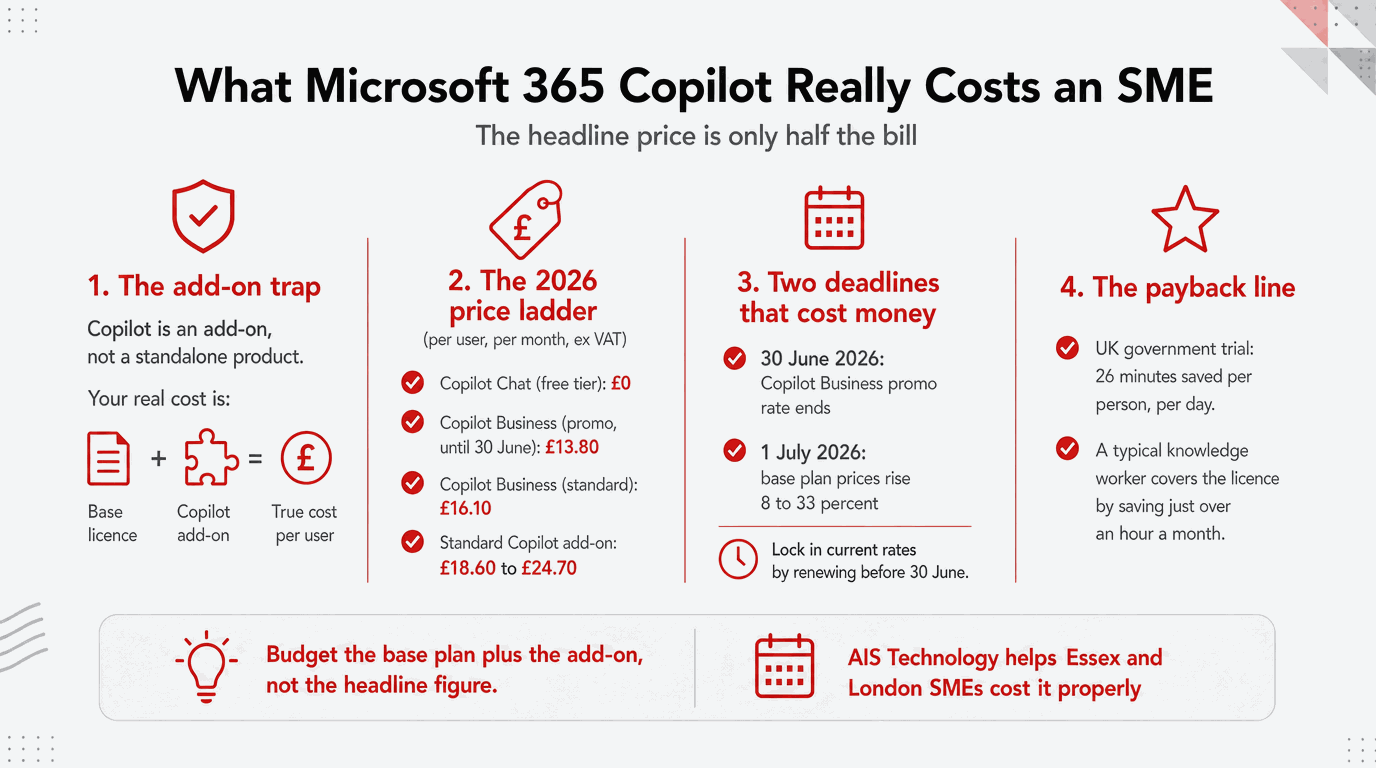
Microsoft sets Copilot pricing internationally, so the sterling figure moves a little with exchange rates and with the SKU you choose. As of June 2026, here is where UK pricing sits. All figures are per user per month, exclude VAT, and assume an annual commitment unless stated.
| Product | Price (per user/month) | Notes |
|---|---|---|
| Copilot Chat (free tier) | Included | Secure AI chat, web-grounded, Outlook integration. No in-app Word/Excel/PowerPoint features since 15 April 2026. |
| Microsoft 365 Copilot Business | £16.10 standard, £13.80 promo | SME SKU for under 300 users. Promo rate runs until 30 June 2026. Requires a qualifying Business base plan. |
| Microsoft 365 Copilot (standard) | Around £18.60 to £24.70 | The original enterprise add-on. Requires E3, E5, Business Standard or Business Premium. |
| Copilot Studio | From around £160/month per tenant | For building custom AI agents. Optional, not needed by most SMEs at the start. |
Two points deserve emphasis because they catch buyers out. First, Copilot is an add-on. It cannot be bought on its own. It sits on top of a qualifying Microsoft 365 base subscription, and that base licence usually costs more than the Copilot add-on itself. Your true all-in cost per user is the base plan plus the Copilot add-on, not the headline Copilot figure alone.
Second, there is no minimum seat requirement for the standalone Copilot Business add-on. Even a ten-person firm can license a subset of users. The bundled promotional pricing does carry a ten-seat minimum, but the unbundled add-on does not. This matters, because the smartest SME rollouts start with a handful of the right users rather than the whole company.
The 2026 deadlines you need to know about
Two timing factors are live right now. The Copilot Business promotional rate of £13.80 per user per month runs until 30 June 2026, after which the standard £16.10 applies. Annual commitments signed before the promo expires lock in the lower rate for the full term. Separately, Microsoft is raising the price of most Microsoft 365 base plans from 1 July 2026, with increases reported between 8 and 33 per cent depending on tier. The new base pricing only takes effect at your first renewal after that date, so businesses renewing before 30 June can lock in current base rates for the agreement term.
Microsoft Copilot licensing explained
Licensing is where most of the cost surprises live, so it is worth being precise. To assign a Microsoft 365 Copilot licence to a user, that user must already hold an eligible base licence. For the standard Copilot SKU, that means Microsoft 365 E3, E5, Business Standard, or Business Premium. For the SME-focused Copilot Business SKU, the user needs a Microsoft 365 Business plan and the organisation must have fewer than 300 users.
You do not have to license every user in your tenant. Copilot licences can be assigned to a subset of users, and only those users need to hold an eligible base licence. For a mixed estate where some staff are on Basic and others on Standard or Premium, this is an important lever. You upgrade and license only the people who will genuinely use the tool.
There is one planning trap worth flagging. Organisations on certain legacy plans may need to upgrade their base licence before Copilot can be added, and that upgrade can cost more than the Copilot add-on itself. Mapping your current licences before you start is part of avoiding an unwelcome surprise on the quote.
Copilot Business vs the standard Copilot SKU
The newer Microsoft 365 Copilot Business SKU, launched at Microsoft Ignite 2025, was created specifically because smaller companies wanted a version sized for their needs and budgets. It delivers the same core capabilities as the standard Microsoft 365 Copilot product, but at a lower price point, for organisations with fewer than 300 users on a Business base plan. For most SMEs reading this, Copilot Business is the SKU to evaluate first. The standard SKU becomes relevant once you are on enterprise E3 or E5 licensing or grow past the 300-user threshold.
Is Microsoft Copilot worth it for an SME?
The honest answer is that it depends entirely on adoption, and adoption depends on choosing the right users. Independent analysis suggests only a small fraction of organisations that piloted Copilot moved to a larger-scale deployment, and the common failure pattern is predictable. Licences get approved, usage spikes in week one, then plateaus by month three as staff drift back to their old habits.
The maths, when it works, is compelling. Take the government trial benchmark of 26 minutes saved per person per day. For a knowledge worker on a typical salary, the licence pays for itself if it saves little more than an hour a month. The trial suggested savings far beyond that. The catch is that these savings only materialise for people whose work genuinely involves heavy document creation, email, meetings, and analysis. A warehouse operative or a part-time bookkeeper will not see the same return as a bid writer, a consultant, or an operations manager.
Where Copilot delivers the strongest return
Copilot works best for businesses that already live inside Microsoft 365, where Teams, Outlook, and SharePoint are the primary places work happens. The return is weaker if your organisation runs much of its work through tools Copilot cannot see by default, such as Slack, Google Workspace, or a third-party CRM. Copilot grounds itself in Microsoft Graph, which means it works with your Microsoft 365 data out of the box and needs custom connectors to reach beyond it.
Microsoft Copilot vs ChatGPT for business
A question we hear often is how Copilot compares to ChatGPT. They are different tools for different jobs. ChatGPT is a general-purpose assistant that does not, by default, have secure access to your business data. Microsoft 365 Copilot is grounded in your organisation's own files and email through Microsoft Graph, operates within your existing Microsoft 365 permissions and security controls, and works inside the apps your team already uses. For a business that wants AI assistance that understands its own documents and respects its own access controls, Copilot is the more natural fit. For open-ended research or content tasks unconnected to internal data, a general assistant may suffice. Many SMEs end up using both for different purposes.
The data governance check most buyers skip
This is the single most important thing to address before you deploy, and the one most often overlooked. Copilot surfaces content based on each user's existing permissions. If your Microsoft 365 environment has over-permissioned SharePoint sites, stale files nobody has cleaned up, or sensitive documents without proper sensitivity labels, Copilot can surface confidential information to people who should not see it. It does not break your permissions. It simply makes the consequences of loose permissions immediately visible.
A pre-deployment data governance review is not optional for any business handling sensitive or regulated data. It is a prerequisite. This work also overlaps directly with your wider UK GDPR obligations, since both come down to controlling who can access what. For regulated firms, it sits alongside the kind of controls covered by Cyber Essentials certification and a sound information security posture.
Thinking about Copilot but not sure where to start?
AIS Technology helps SMEs across London and Essex make the right Copilot decision. We map your licensing, identify the users who will see real returns, run the pre-deployment data governance check, and handle the rollout so the investment does not stall at month three. The promotional pricing window closes on 30 June 2026, so it is worth moving quickly.
Book a free Copilot readiness review
What to check before you buy
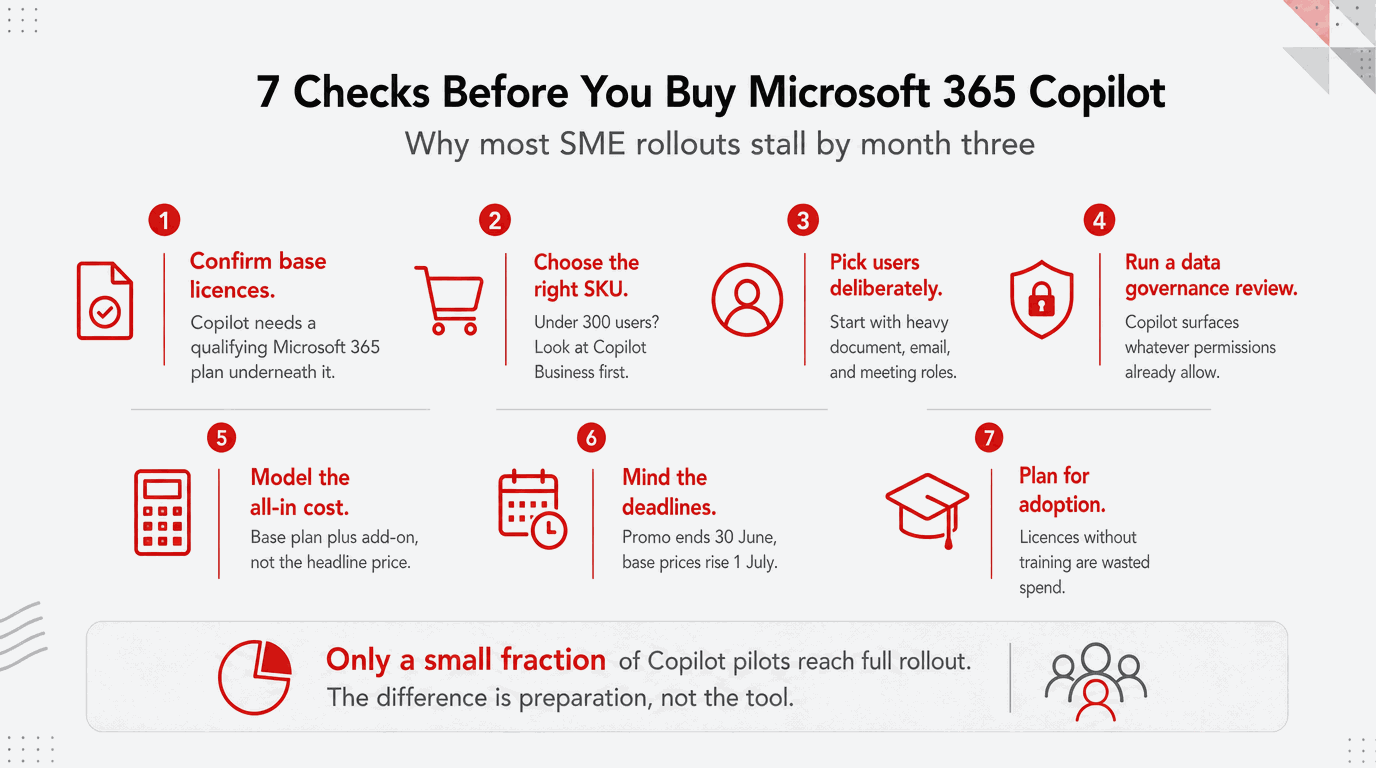
Run through this list before you commit budget. Each item maps to a cost surprise or an adoption failure we see regularly.
- Confirm your base licences. Check which Microsoft 365 base plan each intended Copilot user holds, and whether any need upgrading first.
- Choose the right SKU. For under 300 users on a Business plan, evaluate Copilot Business before the standard SKU.
- Pick your first users deliberately. Start with the roles that do heavy document, email, meeting, and analysis work, not the whole company.
- Run a data governance review. Audit SharePoint permissions and sensitivity labels before Copilot can surface anything it should not.
- Model the all-in cost. Budget the base licence plus the Copilot add-on per user, not the headline Copilot figure alone.
- Mind the deadlines. The promo rate ends 30 June 2026, and base plan prices rise from 1 July 2026 at your next renewal.
- Plan for adoption. Budget time for training and prompt coaching, because licences without adoption are wasted spend.
How AIS Technology helps SMEs adopt Copilot
AIS Technology delivers managed IT support and Microsoft 365 services to small and medium-sized businesses across London and Essex. For Copilot specifically, we handle the licensing analysis, the user selection, the pre-deployment data governance work, and the rollout and training that turns a licence into an actual productivity gain. Because we already manage the underlying Microsoft 365 environment for many of our clients, the security and permissions groundwork that Copilot depends on is work we do as standard. If your business is also weighing up wider questions of data protection and security maturity, our cybersecurity solutions and certification support dovetail naturally with a Copilot rollout.
Frequently asked questions
How much does Microsoft 365 Copilot cost in the UK? As of June 2026, Microsoft 365 Copilot Business, the SKU aimed at SMEs with fewer than 300 users, costs £16.10 per user per month on an annual commitment, with a promotional rate of £13.80 running until 30 June 2026. The standard Microsoft 365 Copilot add-on sits higher, typically between £18.60 and £24.70 per user per month. All figures exclude VAT and require a qualifying Microsoft 365 base licence on top.
Is Microsoft Copilot an add-on or a standalone product? Copilot is an add-on. It cannot be purchased on its own. Each Copilot user must hold an eligible Microsoft 365 base licence, such as Business Standard, Business Premium, E3, or E5. Your true cost per user is the base plan plus the Copilot add-on combined, which is why the headline Copilot price understates the real budget impact.
Do I need to buy Copilot for every employee? No. There is no minimum seat requirement for the standalone Copilot Business add-on, so you can license a subset of users. Only the users who receive a Copilot licence need to hold an eligible base licence. Most successful SME rollouts begin with a small group of high-value users and expand once the return is proven.
What is the difference between Microsoft Copilot and ChatGPT? ChatGPT is a general-purpose AI assistant that does not, by default, have secure access to your business data. Microsoft 365 Copilot is grounded in your organisation's own files and email through Microsoft Graph, works inside the Microsoft 365 apps your team already uses, and respects your existing permissions and security controls. For AI assistance tied to your own business data, Copilot is the more natural fit.
Is Microsoft Copilot worth it for a small business? It can be, but only with the right users and proper adoption. The productivity savings are strongest for staff who spend significant time on document creation, email, meetings, and data analysis. A UK government trial found average savings of 26 minutes per person per day. The common failure is licensing too broadly and not supporting adoption, which leaves usage to plateau within a few months.
Is Microsoft Copilot secure and GDPR compliant? Microsoft 365 Copilot operates within your existing Microsoft 365 security and permissions and carries enterprise compliance certifications. The main risk is not the tool itself but your own data hygiene. Because Copilot surfaces content based on each user's permissions, over-permissioned sites or unlabelled sensitive files can be exposed to the wrong people. A pre-deployment data governance review addresses this and supports your wider UK GDPR obligations.
Which Copilot licence should an SME choose? For most SMEs with fewer than 300 users on a Microsoft 365 Business plan, Microsoft 365 Copilot Business is the SKU to evaluate first, as it delivers the same core capabilities at a lower price point than the standard SKU. The standard Microsoft 365 Copilot add-on becomes relevant for organisations on enterprise E3 or E5 licensing, or those above the 300-user threshold.
Get Copilot right the first time
AIS Technology helps SMEs across London and Essex choose the right Copilot licensing, prepare their data, and roll it out so it actually delivers. Talk to our team about a free Copilot readiness review tailored to your business.