

Business Continuity Plan Template for Small Businesses (Free Guide)
Every business depends on its IT systems. Email, cloud storage, accounting software, customer databases, phone systems. When any of these go down, work stops. Revenue stops. Client trust erodes. And for a small business without a plan, even a short outage can turn into a serious problem.
A business continuity plan is the document that tells your team exactly what to do when something goes wrong. It identifies your most critical systems, sets out how quickly each one needs to be restored, and gives everyone a clear set of steps to follow so that a bad situation does not become a catastrophic one.
This guide walks you through how to build a practical business continuity plan with a particular focus on IT, because for most small businesses in 2026, IT is the backbone of every operation. It includes a free business continuity plan template you can download, fill in, and start using straight away.
Download the free template (PDF)
What Is a Business Continuity Plan?
A business continuity plan (often shortened to BCP) is a document that sets out how your organisation will keep operating during and after a disruptive event. It covers everything from who makes decisions during a crisis, to which systems get restored first, to how you communicate with staff and clients while things are being fixed.
The disruption could be anything: a ransomware attack that locks your files, a server failure that takes your email offline, a flood that makes your office unusable, or a key supplier going out of business overnight. The cause matters less than the outcome. In almost every scenario, you lose access to one or more of the following: your premises, your people, your IT systems, your data, or your supply chain.
A good business continuity plan does not try to prevent every possible incident. That is what your cybersecurity controls, insurance policies, and health and safety measures are for. Instead, it accepts that incidents will happen and provides a structured way to respond, recover, and get back to normal with the least possible damage.
Why Small Businesses Need a Business Continuity Plan
There is a common assumption that business continuity planning is something only large enterprises need to worry about. That assumption is wrong, and it is particularly dangerous for smaller organisations.
A large company with 500 employees and a dedicated IT department can absorb a two day outage. They have redundant systems, multiple offices, and the financial reserves to weather the disruption. A small business with 15 people and one office does not have that luxury. When the systems go down, the entire operation stops.
The UK government's Cyber Security Breaches Survey 2025/2026 found that 43% of UK businesses identified a breach or attack in the previous twelve months. For medium sized firms, the figure was 65%. The average cost of a breach for a small business runs into thousands of pounds when you factor in lost revenue, recovery costs, and reputational damage. The recent Jaguar Land Rover ransomware attack showed just how quickly a cyber incident can cascade through an entire supply chain.
Beyond the financial argument, there are commercial and regulatory reasons to have a plan in place. Clients and supply chain partners increasingly expect to see evidence of continuity planning during due diligence. Government contracts may require it. Insurers look favourably on businesses that can demonstrate they have a tested plan. And under UK law, company directors have a duty to exercise reasonable care and skill, which includes preparing for foreseeable risks.
A business continuity strategy does not need to be complicated. For most small businesses, it starts with a single document that identifies the critical systems, sets realistic recovery targets, and gives your team a clear set of instructions. The point is not to create a 50 page report that nobody reads. It is to produce something practical that your people can actually use under pressure.
It is also worth noting the connection to frameworks like Cyber Essentials and ISO 22301. Cyber Essentials, the UK government backed cybersecurity certification, now explicitly references backup and recovery as part of its controls. ISO 22301 is the international standard for business continuity management, and while certification is not required for most SMEs, understanding its principles will strengthen your plan. If you are pursuing Cyber Essentials certification, having a documented business continuity plan demonstrates a level of operational maturity that assessors and clients notice.
Business Continuity Plan vs Disaster Recovery Plan
These two terms are often used interchangeably, but they are not the same thing.
A business continuity plan is the broader document. It covers how the whole business keeps running during a disruption, including non IT considerations like alternative premises, staff communication, and client management.
A disaster recovery plan is a subset of the business continuity plan that deals specifically with restoring IT systems and data after an incident. It covers your backups, your recovery procedures, your failover systems, and the technical steps needed to get your infrastructure back online.
For most small businesses, both plans live in the same document. You do not need two separate plans unless your organisation is large enough to have distinct operational and IT recovery teams. What matters is that both aspects are covered.
How to Write a Business Continuity Plan
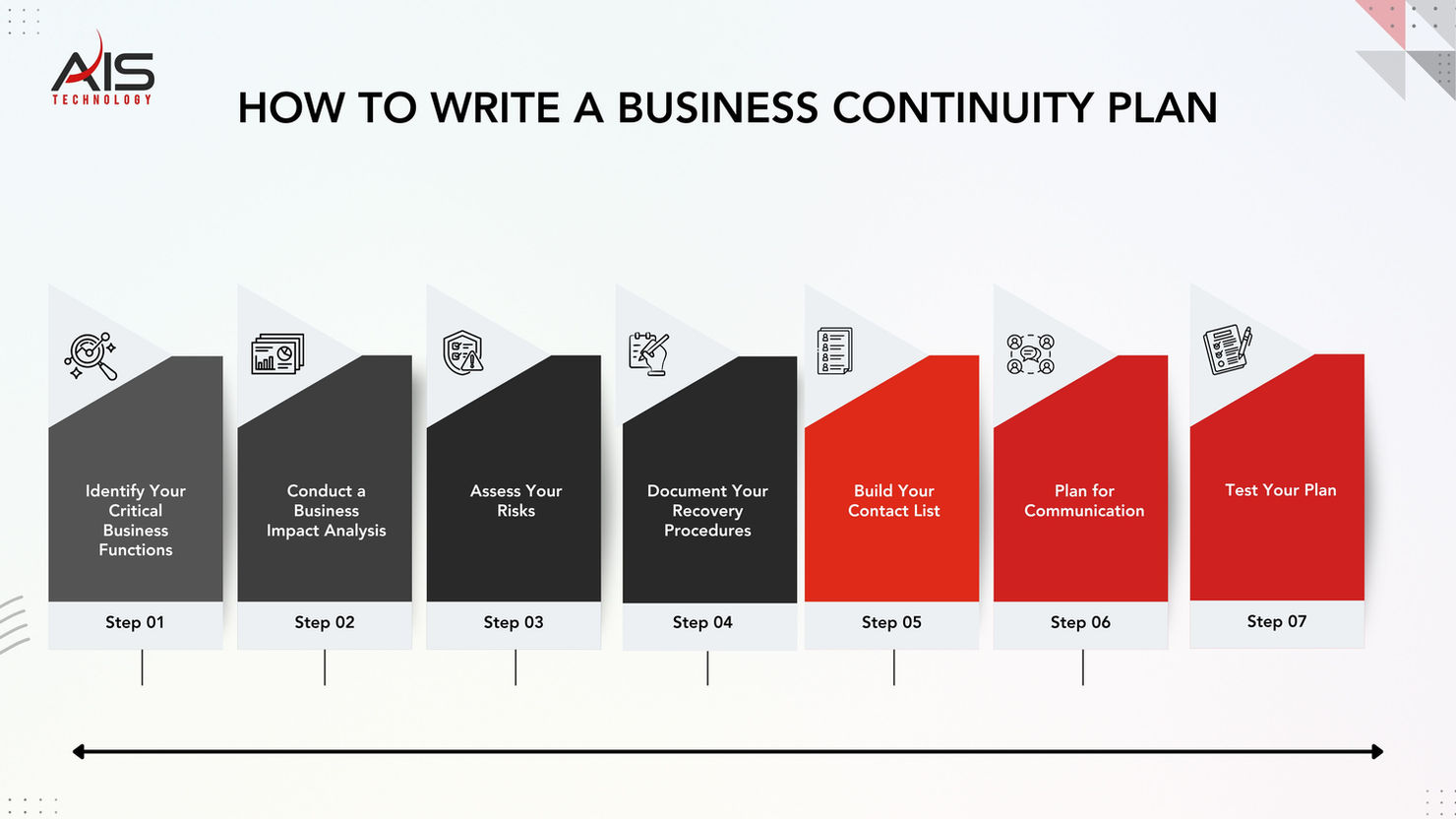
Step 1: Identify Your Critical Business Functions
Start by listing every function your business performs and ranking them by how critical they are. Ask yourself: if this function stopped working right now, how long could we survive without it?
For most small businesses, the critical functions include: processing customer orders, sending and receiving email, accessing your CRM or client database, making and receiving phone calls, running payroll, and accessing your accounting system. Everything else, while important, can usually wait a few days.
Step 2: Conduct a Business Impact Analysis
A business impact analysis looks at each critical function and asks: what happens if we lose it? How much does it cost us per hour? Per day? What are the knock on effects for clients, staff, and revenue?
This is where you define two essential metrics that will drive every recovery decision you make.
Recovery Time Objective (RTO) is the maximum amount of time a system can be down before the impact becomes unacceptable. For email, your RTO might be four hours. For your website, it might be 24 hours. For a backup phone system, it could be one hour.
Recovery Point Objective (RPO) is the maximum amount of data you can afford to lose, measured in time. If your recovery point objective is one hour, you need backups running at least every hour. If your RPO is 24 hours, daily backups are sufficient. Getting this number right is critical because it determines the frequency and type of backup solution you need.
Document both metrics for every critical system. They will determine what backup solutions you need and how much you should invest in redundancy.
Step 3: Assess Your Risks
List the threats that could disrupt each critical function. For IT systems, the most common threats for UK small businesses include: ransomware and malware attacks, hardware failure (server, firewall, or switch), internet connectivity outage, cloud service provider downtime, loss of a key IT person or supplier, power failure, and physical damage to premises from flood, fire, or theft.
For each risk, estimate the likelihood (how often could this realistically happen?) and the impact (how severely would it affect your business?). This does not need to be a sophisticated risk matrix. A simple high, medium, or low rating for each is enough to prioritise your planning.
Step 4: Document Your Recovery Procedures
This is the core of your plan. For every critical system, write down exactly how it will be recovered. Be specific. Do not write "restore from backup." Write "contact [name] at [provider] on [phone number], request a restore of the [system name] backup from [location], estimated restore time is [X] hours, verify by [testing method]."
Your recovery procedures should cover the following for each critical system: who is responsible for initiating the recovery, what steps they need to follow, who to contact (internal and external), what credentials or access details are needed, how to verify the system is working correctly after restoration, and what to communicate to staff and clients during the outage.
For businesses running Microsoft 365 or Azure, having a managed cloud provider who handles your backup configuration, failover, and restore procedures means you are not scrambling to figure it out during an incident.
Step 5: Build Your Contact List
Create a single reference sheet with every contact your team might need during an incident. This should include your IT support provider or MSP and their out of hours number, your internet service provider, your cloud service provider (Microsoft 365 admin, Azure, AWS), your insurance company and policy number, key staff members and their personal mobile numbers, your accountant, your landlord, and any critical suppliers.
Print this list and keep a copy somewhere accessible outside your office. If your office is the problem, you need to be able to reach these contacts from anywhere.
Step 6: Plan for Communication
When systems go down, the first question from every staff member and every client is: what is happening and when will it be fixed? If you do not have a communication plan, you will spend the first hours of an incident fielding calls and emails instead of fixing the problem.
Decide in advance: how will you notify staff if email is down (a WhatsApp group, a phone tree, a text message service)? Who is responsible for updating clients? What is the holding message for your phone system? Do you have a status page or alternative communication channel you can activate?
Step 7: Test Your Plan
A business continuity plan that has never been tested is a business continuity plan that will not work when you need it. Testing does not need to be dramatic. Start with a tabletop exercise: gather your key people around a table, present a scenario ("our email has been down for three hours and we cannot access SharePoint"), and walk through the plan step by step.
Does everyone know their role? Are the contact numbers correct? Can you actually reach your backup provider? Is the restore procedure accurate? Testing reveals gaps that look obvious in hindsight but are invisible on paper.
Test at least once a year, and after any significant change to your IT setup such as a cloud migration, a new office, or a change of IT provider.
What Your Business Continuity Plan Should Include
| Section | What It Covers |
|---|---|
| Plan Overview | Purpose, scope, who the plan applies to, version control and review dates |
| Critical Functions Register | List of business critical activities ranked by priority with RTO and RPO for each |
| Business Impact Analysis | Financial and operational impact of losing each critical function, per hour and per day |
| Risk Assessment | Identified threats, their likelihood, and their potential impact on operations |
| IT Systems Inventory | Every system, application, and cloud service your business relies on, with login details stored securely |
| Backup and Recovery Procedures | Where backups are stored, how to initiate a restore, expected recovery times, and verification steps |
| Emergency Contact List | IT provider, ISP, cloud provider, insurance, key staff, landlord, critical suppliers |
| Communication Plan | How to reach staff, clients, and partners if primary communication channels are down |
| Roles and Responsibilities | Who does what during an incident, including a named incident lead and deputies |
| Alternative Working Arrangements | Remote working setup, alternative premises, mobile device readiness |
| Testing Schedule | When and how the plan will be tested, who participates, and how findings are recorded |
| Review and Update Log | Version history, dates of review, changes made, and sign off by a senior person |
Need help putting your business continuity plan together?
Most small businesses know they need a plan but never get round to creating one. We get it. AIS Technology can review your current IT setup, identify your recovery gaps, and help you build a tested business continuity plan that actually works when you need it. No templates gathering dust, just a practical plan backed by the infrastructure to deliver on it.
The IT Recovery Side and What Most Small Businesses Get Wrong
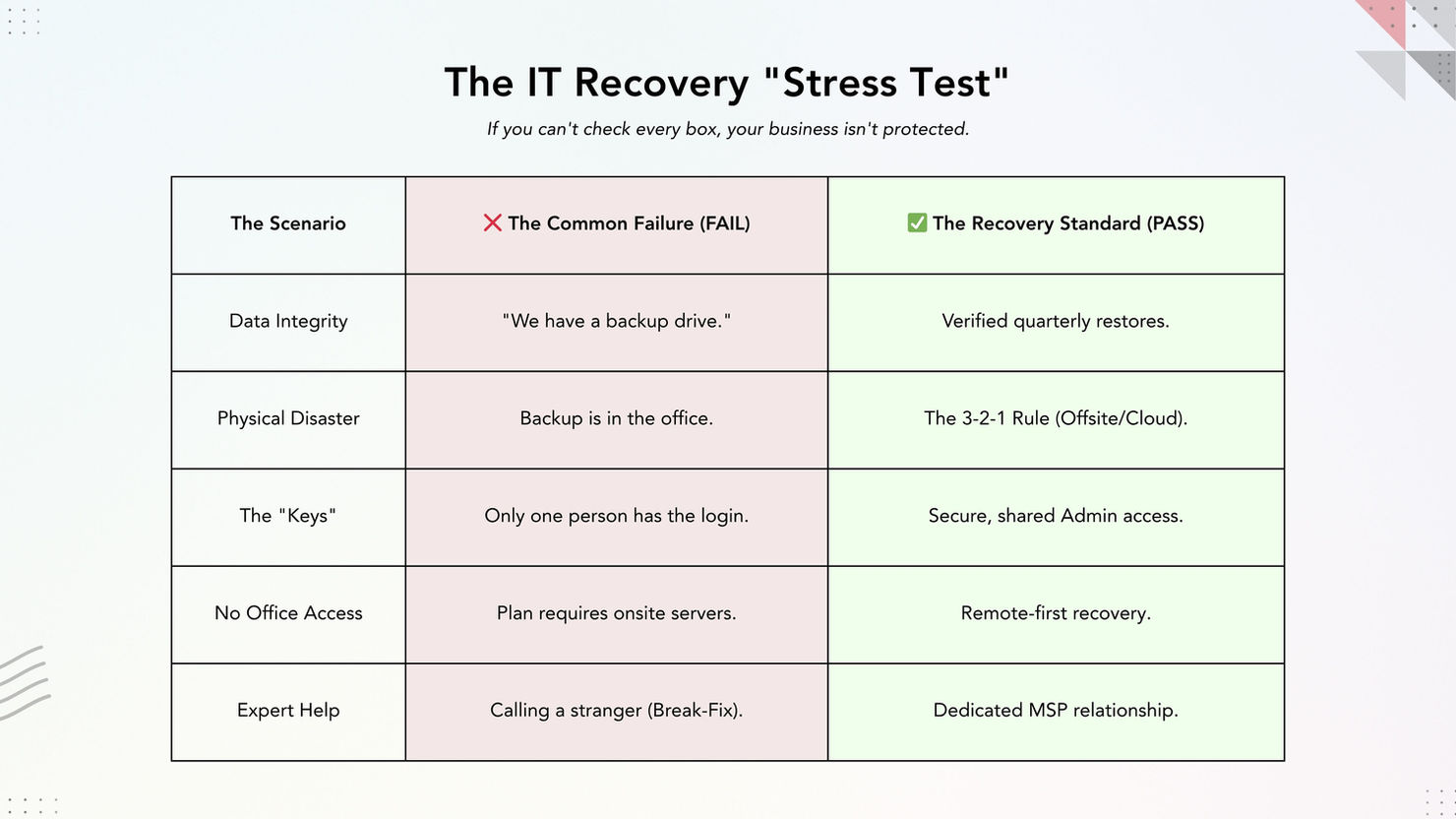
The most common failure in small business continuity planning is not a missing plan. It is a plan that looks good on paper but falls apart in practice because the IT recovery element has not been properly thought through. Here are the mistakes we see most often.
Backups exist but have never been tested. Having a backup is not the same as having a working backup. If you have never restored from your backup, you do not know if it works. Run a test restore at least quarterly.
The 3 2 1 backup rule is ignored. If your backup drive sits next to your server and both are destroyed in a flood, you have nothing. The 3 2 1 backup rule is the industry standard for data protection: keep three copies of your data, on two different types of media, with one copy stored offsite or in the cloud. It is simple, well proven, and the single most effective safeguard you can put in place. If your current backup does not follow this rule, that should be the first thing you fix.
No one knows the admin passwords. If your IT person is unavailable and no one else can access your Microsoft 365 admin portal, your cloud firewall, or your backup management console, you are stuck. Store credentials securely and make sure more than one person knows how to access them.
The plan assumes the office is available. If your business continuity plan requires access to a physical server room and that room is the thing that has been compromised, the plan fails immediately. Build your recovery procedures around remote access as the default.
There is no relationship with a professional IT provider. When a serious incident happens, small businesses without a managed IT support relationship often find themselves at the back of the queue, calling break fix providers who have never seen their systems before. Having an MSP who already knows your setup is one of the most practical investments you can make in business continuity.
How confident are you that your backups actually work?
We regularly find businesses with backup systems that have never been tested, admin passwords that nobody can locate, and recovery procedures that assume the office is still standing. A 30 minute conversation with our team can tell you whether your IT setup would survive a real incident or fall apart under pressure.

How Often Should You Review Your Business Continuity Plan?
A business continuity plan is not a document you write once and file away. It needs to be reviewed and updated regularly to remain useful.
At a minimum, review your plan once a year. Beyond that, you should update it whenever there is a significant change to your business: a new office, a cloud migration, a change of IT provider, new staff joining in key roles, or a new system being deployed.
Every review should check that contact numbers are still correct, recovery procedures still match your actual setup, RTOs and RPOs still reflect your current business priorities, and any lessons from incidents or tests have been incorporated.
Keep a version log at the front of the document so it is always clear when the plan was last reviewed and by whom.
If you are not sure whether your current plan reflects your actual IT setup, an independent review from an IT consultancy can identify the gaps before an incident does.
Frequently Asked Questions
What is a business continuity plan?
A business continuity plan is a document that sets out how your organisation will keep operating during and after a disruptive event. It identifies your critical business functions, assesses the impact of losing them, and provides step by step recovery procedures so your team knows exactly what to do when something goes wrong.
Is a business continuity plan legally required in the UK?
It is not a blanket legal requirement for all businesses. However, it is mandatory or strongly expected in regulated sectors such as financial services (FCA), healthcare (CQC), and organisations handling personal data under GDPR. Beyond regulation, company directors have a legal duty to manage foreseeable risks, and a tested continuity plan is strong evidence of that duty being fulfilled.
What is the difference between a business continuity plan and a disaster recovery plan?
A business continuity plan covers the whole business: people, premises, systems, suppliers, and communication. A disaster recovery plan is a subset that deals specifically with restoring IT systems and data. For most small businesses, both are covered in a single document.
How long does it take to create a business continuity plan?
For a small business with straightforward IT, you can produce a working first draft in a day if you follow a structured template. The deeper work, testing it, refining it, and getting it signed off, typically takes two to four weeks.
What is a recovery time objective?
A recovery time objective (RTO) is the maximum acceptable amount of time a system or function can be offline before the impact becomes unacceptable. For example, if your email has an RTO of four hours, your plan must be able to restore email within that window.
How often should a business continuity plan be tested?
At least once a year, and after any significant change to your IT setup. Testing can be as simple as a tabletop exercise where you walk through a scenario with your team, or as thorough as a live failover test where you actually restore systems from backup.
Download the Free Business Continuity Plan Template
We have put together a practical, fillable business continuity plan template designed specifically for UK small businesses. It follows the structure outlined in this guide and includes prompts for every section so you are not starting from a blank page.
The template is free to download and covers your critical functions register, business impact analysis, IT recovery procedures, emergency contacts, and testing schedule.
Download it, fill it in, and test it. That single step puts you ahead of the majority of UK SMEs who still have no documented plan at all.
Eight pages, no email address required. Every field can be typed into and saved in any PDF reader, or printed and filled in by hand.
If you want help building your plan, reviewing your IT resilience, or setting up the backup and disaster recovery systems that underpin it, AIS Technology can help. We support businesses across London and Essex with managed IT services, cloud solutions, and cybersecurity, including the kind of proactive monitoring and tested backup infrastructure that makes a business continuity plan actually work when you need it. Get in touch for a no obligation conversation about your continuity needs.
Tags: Business IT Support · IT Best Practices · Compliance · Disaster Recovery · Business Continuity