

Cyber Essentials Certification: The Complete 2026 Guide for UK SMEs
If you run a small or medium sized business in the UK and you have been hearing more about Cyber Essentials recently, there is a good reason for that. The government is pushing harder than ever for businesses to adopt baseline security standards, and from April 2026 the scheme itself is getting stricter.
This guide explains what Cyber Essentials actually is, what it costs, what the five technical controls involve, how the certification process works, and what is changing in the April 2026 update. It is written for business owners and decision makers, not IT specialists, although your IT team or managed service provider will find the technical detail useful too.
If you would rather skip to the numbers, our Cyber Essentials certification page has a cost calculator and a one minute readiness check that tells you whether you would pass today.
What Is Cyber Essentials?
Cyber Essentials is a UK government backed certification scheme managed by the National Cyber Security Centre (NCSC). It is designed to help organisations of all sizes protect themselves against the most common internet based cyber threats.
The scheme focuses on five technical controls. When these are implemented properly, they can prevent the vast majority of commodity cyber attacks. The kind of threats that most small businesses actually face are not sophisticated state sponsored operations. They are automated scans, phishing emails, and opportunistic ransomware. Cyber Essentials addresses exactly those threats.
There are two levels of certification:
- Cyber Essentials is a verified self assessment. You complete a questionnaire about your IT setup, a qualified assessor reviews your answers, and if everything meets the standard you receive your certificate. There is no hands on technical audit.
- Cyber Essentials Plus builds on the basic certification with independent technical testing. An assessor will run vulnerability scans, check your device configurations, and verify that the controls are genuinely in place rather than just reported.
Both certificates are valid for 12 months and must be renewed annually.
Why Cyber Essentials Certification Matters for Your Business
There are practical, commercial reasons to get certified. It is not just a compliance exercise. Government contracts are the most obvious driver. If you bid for any central government work that involves handling sensitive or personal data, Cyber Essentials certification is mandatory. Increasingly, local authorities and NHS trusts are following suit. This is particularly relevant for financial services firms, where regulatory expectations around data protection are already high.
Supply chain pressure is growing rapidly. Large organisations are being told to secure their supply chains using the Cyber Essentials framework. The NCSC published a Supply Chain Playbook specifically for this purpose. If you are a supplier to a larger business, expect to be asked for your certificate.
Insurance benefits are significant. UK organisations with a turnover under £20 million that achieve Cyber Essentials certification covering their whole organisation automatically receive £25,000 of cyber liability insurance at no extra cost. This includes access to a 24 hour incident response helpline covering technical, legal, and crisis management support.
The risk reduction is measurable. According to IASME claim data, organisations certified to Cyber Essentials are "92% less likely to make a cyber insurance claim" compared to those without certification. When St. James's Place mandated Cyber Essentials Plus across 2,800 businesses in its network, they saw an 80% reduction in cyber security incidents overnight.
Client confidence also plays a role. Displaying the Cyber Essentials badge on your website and proposals signals that you take data protection seriously. For financial services firms, consultancies, and any business handling client data, this matters.
The Five Technical Controls Explained
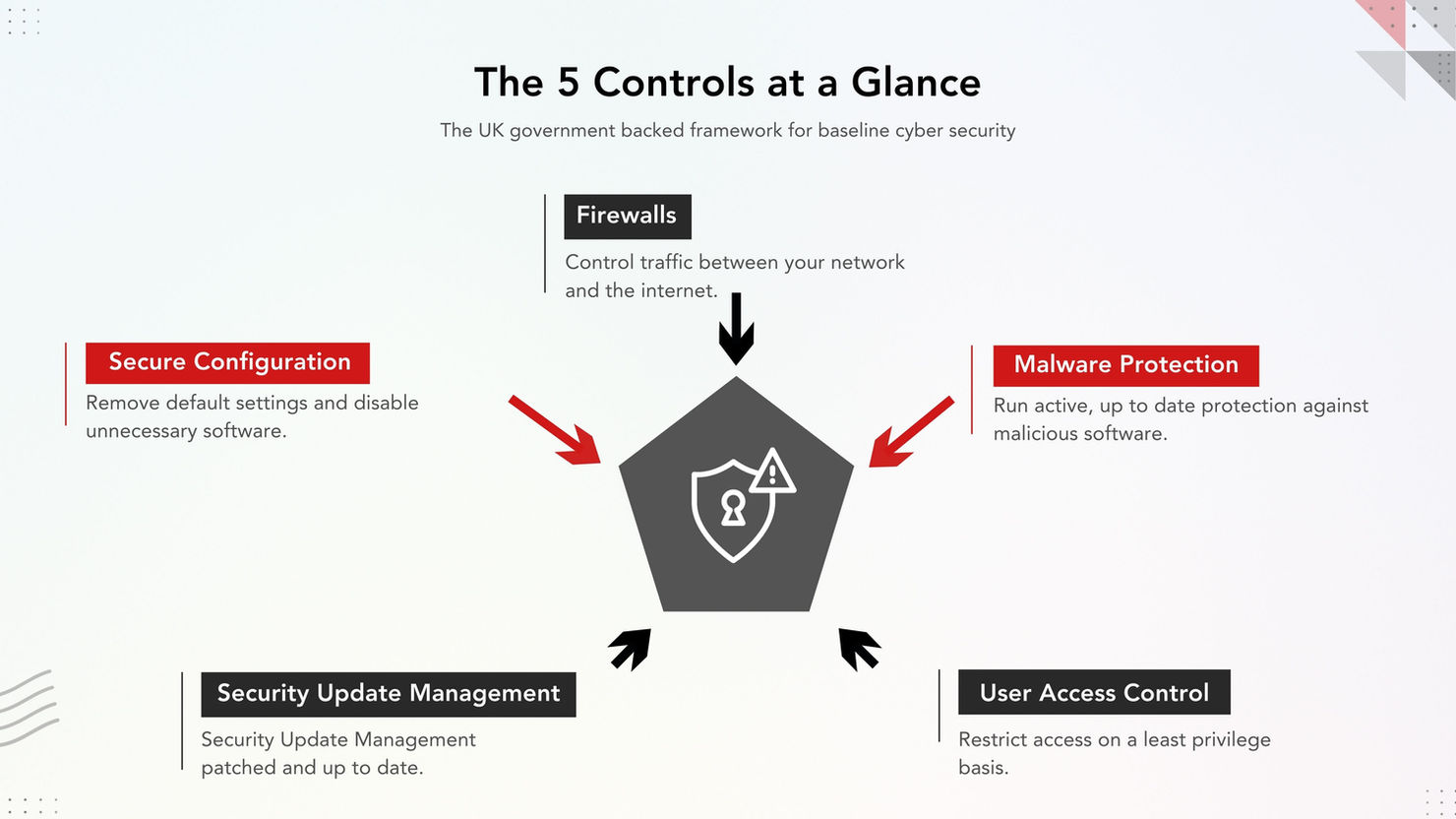
The entire Cyber Essentials framework is built around five technical controls. Each one addresses a specific and common attack vector. Here is what they involve and what they mean in practice for a typical SME.
1. Firewalls
Firewalls create a controlled barrier between your internal network and the internet. Every device that connects to the internet needs to be protected by a properly configured firewall. This includes your office router, any cloud based firewall services, and the software firewalls built into your laptops and desktops.
In practical terms, this means changing default passwords on your router, closing unnecessary ports, and making sure your boundary devices are not exposing services to the internet that do not need to be there. For businesses using cloud platforms like Microsoft 365 or Azure, conditional access policies and network controls are part of this picture.
2. Secure Configuration
Every computer, server, tablet, and phone comes with default settings that are designed for convenience, not security. Secure configuration means removing or disabling software and services you do not use, changing default credentials, and ensuring devices are deliberately hardened before they are deployed.
Under the 2026 update, this control is getting stricter. You will need to demonstrate that vendor installed utilities and bundled applications that are not required for business purposes have been removed or disabled. Default installs are no longer acceptable simply because they came with the device.
3. Security Update Management
This is about keeping your software patched and up to date. Operating systems, applications, firmware, and drivers all need regular updates to fix known vulnerabilities.
The 2026 update introduces a clear, measurable requirement: all software on devices within scope must be updated within 14 days where the vendor describes the vulnerability as critical or high risk, or where the vulnerability has a CVSS v3 base score of 7 or above. Unsupported software (anything that no longer receives security updates from its vendor) must be removed from scope entirely.
4. User Access Control
This control ensures that only the right people have access to the right systems and data. Admin accounts should only be used for administrative tasks. Day to day work should be done on standard user accounts. Access should be granted on a least privilege basis, meaning people only get access to what they genuinely need.
Multi factor authentication (MFA) is a critical part of this control and has become significantly more important under the 2026 changes. Where any cloud service offers MFA, it must be enabled. Partial implementation, for example only applying MFA to admin accounts, is no longer sufficient.
5. Malware Protection
You need active protection against malicious software. This can be traditional antivirus, endpoint detection and response (EDR) tools, or application whitelisting. The key is that it must be active, up to date, and configured to scan files automatically.
For most SMEs running Windows devices, Microsoft Defender (included with Windows 10 and 11) meets the basic requirements when properly configured. However, businesses with higher risk profiles or those pursuing Cyber Essentials Plus may benefit from a more comprehensive EDR solution.
How Much Does Cyber Essentials Certification Cost?
Certification fees are set by IASME and priced according to the size of your organisation. Here are the current fee bands for basic Cyber Essentials, or use the cost calculator to see your figure including Plus.
| Organisation Size | Employees | Fee (+ VAT) |
|---|---|---|
| Micro | 0 to 9 | £320 |
| Small | 10 to 49 | £440 |
| Medium | 50 to 249 | £500 |
| Large | 250+ | £600 |
Cyber Essentials Plus costs more because it involves a hands on technical audit. Pricing varies depending on the size and complexity of your IT environment, but typical costs range from around £1,400 for a small business up to £3,000 or more for larger organisations with multiple locations or complex cloud setups. You must hold a valid basic Cyber Essentials certificate before applying for Plus, and you have three months to complete the Plus assessment after receiving your basic certification.
Beyond the certification fees, factor in the cost of any remediation work needed to meet the standard. If your systems are already reasonably well managed, this may be minimal. If you have outdated software, weak passwords, or MFA not enabled across your cloud services, you will need to address those gaps before applying.
Businesses that use an IT support provider or managed service provider (MSP) often find that their existing provider can handle the preparation and remediation as part of their normal service, particularly if it includes proactive security management and patch management.
Not sure whether your business would pass?
Our one minute readiness check runs through the six things that decide most assessments and tells you where you stand. It works out the answer in your browser and nothing is submitted anywhere.
Closing whatever it finds is the part that takes real time, and it is ordinary managed IT work: patching, MFA, device management, retiring end of life kit. That is why we baseline every managed service client to the Cyber Essentials standard as a matter of course rather than selling certification on its own.
The Certification Process Step by Step
Getting certified is more straightforward than many business owners expect. Here is how the process works.
Step 1: Understand your scope. Work out which devices, users, and cloud services fall within scope of the assessment. Under the 2026 rules, any device that connects to the internet and any cloud service that stores your data is in scope. You cannot exclude things without proper justification.
Step 2: Prepare your answers. Download the Cyber Essentials assessment questions and the Requirements for IT Infrastructure document from the IASME website. Both are available free of charge. Review them carefully and prepare your responses. The NCSC also offers a free Readiness Tool that walks you through the questions and gives you a tailored action plan.
Step 3: Register and pay. Purchase your assessment through IASME based on your organisation size. You will receive login details for the secure assessment platform. You have up to six months to complete your submission.
Step 4: Complete the self assessment. Answer the questions in the online platform. Save your progress as you go. A senior person in your organisation must confirm that the answers are accurate before submission.
Step 5: Assessment and feedback. A qualified assessor from a Certification Body reviews your answers within three working days. If they need clarification or additional information, you can update and resubmit. Each resubmission is reviewed within three working days.
Step 6: Certification. Once your assessment meets all requirements, your certificate is issued. You receive a digital badge to display on your website and marketing materials. The certificate is valid for 12 months.
What Is Changing in April 2026
From 27 April 2026, IASME is introducing version 3.3 of the Cyber Essentials requirements, known as the Danzell question set. Any assessment account created after that date will be judged against these updated standards.
The five core controls remain the same. What changes is how strictly they are interpreted and what evidence is required. Here are the most significant updates.
MFA becomes a pass or fail requirement
Under the current rules, if a cloud service offers MFA and you have not enabled it, you receive a warning (a major non compliance) but can still pass. From April 2026, this becomes an automatic failure. If any cloud service you use offers MFA, whether free, included in your subscription, or available as a paid add on, and you have not switched it on, you will not pass.
Stricter secure configuration standards
You will need to demonstrate that unnecessary software has been removed or disabled across all devices in scope. Default installations from device manufacturers that serve no business purpose must be addressed.
14 day patching requirement
All high risk vulnerabilities (CVSS 7+) must be patched within 14 days. This is a clear, measurable compliance requirement that will need consistent monitoring and patch discipline to maintain.
This is where proactive managed IT services become essential, because maintaining a 14 day patch cycle across every device requires ongoing monitoring, not a one off fix.
Cloud services formally defined and scoped
For the first time, the requirements include a formal definition of what constitutes a cloud service. This removes ambiguity and means services like Microsoft 365, Google Workspace, and cloud based CRM systems are explicitly in scope.
Passwordless authentication encouraged
The updated requirements place greater emphasis on passwordless authentication methods such as passkeys and FIDO2 security keys as the direction of travel for access control.
If you are already certified and your renewal falls after 27 April 2026, you will need to meet version 3.3 when you renew. If you are planning to certify for the first time, any assessment account created before 27 April will still use the current (less demanding) question set.
Cyber Essentials vs Cyber Essentials Plus: Which Do You Need?
| Cyber Essentials | Cyber Essentials Plus | |
|---|---|---|
| Assessment Type | Verified self assessment | Self assessment + independent technical audit |
| Cost | From £320 + VAT | From ~£1,400 + VAT |
| Technical Testing | No hands on testing | Vulnerability scans, device checks, configuration review |
| Time to Complete | 1 to 4 weeks (depending on preparation) | Must be completed within 3 months of basic CE |
| Best For | Most SMEs, first time certification, businesses needing baseline compliance | Government contract bidders, financial services, businesses handling highly sensitive data |
| Insurance Included | Yes (£25,000 for eligible organisations) | Yes (£25,000 for eligible organisations) |
If you already know you need Plus, our Cyber Essentials Plus page walks through each stage of the technical audit and what you need ready for it.
For most small businesses, basic Cyber Essentials is the right starting point. It demonstrates that you have the fundamental controls in place and qualifies you for the included insurance cover. If you work in a regulated sector, handle particularly sensitive data, or need to compete for government contracts that specifically require Plus, then the additional investment is worthwhile.
Common Reasons Businesses Fail Cyber Essentials
Understanding why businesses fail helps you avoid the same mistakes. Based on assessor feedback and industry data, the most common reasons include:
MFA not enabled across all cloud services. This is the single biggest cause of failure, and from April 2026 it will be an automatic fail with no warnings.
Unsupported software still in use. Running Windows 10 after its end of support date (October 2025), or using applications that no longer receive security patches, will cause a failure.
Default passwords not changed on network equipment. Routers, firewalls, and access points still running manufacturer default credentials are a common finding.
Admin accounts used for daily work. If your staff are using administrator accounts for email and web browsing, that is a control failure.
Incomplete scoping. Trying to exclude devices or services from scope without proper justification is a red flag for assessors.
Backups not tested. Having backups in place is necessary, but if you have never actually tested a restore, you cannot demonstrate resilience.
How to Prepare for Certification
Preparation does not need to be complicated, but it does need to be thorough. Here is a practical approach.
Audit your current setup. List every device that connects to the internet and every cloud service your business uses. This is your scope.
Enable MFA everywhere. Go through every cloud service and enable multi factor authentication for all users, not just administrators. This is the single most impactful step you can take.
Patch everything. Make sure all operating systems, applications, and firmware are up to date. Remove any software that is no longer supported by its vendor.
Review user accounts. Ensure admin accounts are only used for admin tasks. Remove access for anyone who no longer needs it. Check that ex employees and contractors have been properly offboarded.
Check your firewall rules. Change any default passwords on your routers and firewalls. Close ports that are not needed. Document your configuration.
Test your backups. Run a test restore to confirm your backup actually works. Document the results.
Use the NCSC Readiness Tool. This free online tool walks you through the assessment questions and produces a tailored action plan based on your answers.
If you work with a managed IT support provider, ask them to carry out a pre assessment review. A good provider will be able to identify gaps, remediate issues, and support you through the submission.
Our IT consultancy team regularly supports businesses through exactly this process.
Frequently Asked Questions
Is Cyber Essentials mandatory?
It is mandatory for central government contracts involving sensitive or personal data. Beyond that, it is not legally required for all businesses, but it is increasingly expected by supply chain partners, insurers, and clients.
How long does certification take?
The assessment itself can be completed in a few hours if you are well prepared. From registration to receiving your certificate, most businesses complete the process within two to four weeks. You have a maximum of six months from registration to submit.
Can I do it without an IT team?
Yes. The self assessment is designed to be accessible to business owners, not just IT specialists. However, you will need a reasonable understanding of your IT setup. Many businesses work with their IT support provider or an NCSC assured Cyber Advisor for guidance.
Do I need Cyber Essentials Plus?
Most SMEs only need basic Cyber Essentials unless they are bidding for contracts that specifically require Plus, or they want the additional assurance that comes from independent technical testing.
What happens if I fail?
For basic Cyber Essentials, you typically get two days to fix any issues and resubmit at no extra cost. For Cyber Essentials Plus, a failure usually means paying for a new assessment after addressing the issues.
How much does Cyber Essentials cost?
Basic certification starts at £320 + VAT for micro organisations (0 to 9 employees) and goes up to £600 + VAT for large organisations. Cyber Essentials Plus starts from around £1,400 + VAT for small businesses.
Does the certificate expire?
Yes. Both Cyber Essentials and Cyber Essentials Plus are valid for 12 months. You need to renew annually, which is also an opportunity to review and strengthen your security posture.
Getting Started
Cyber Essentials certification is one of the most practical steps a UK business can take to reduce cyber risk, win contracts, and demonstrate credibility to clients and partners. The scheme is designed to be accessible, and the costs are modest relative to the protection and commercial advantages it provides.
If you are not sure where your business stands or you want help preparing for the assessment, talk to your IT support provider. A good managed service provider will be able to assess your readiness, address any gaps, and guide you through the certification process with minimal disruption to your day to day operations.
AIS Technology baselines every managed service client to the Cyber Essentials standard as a minimum, and takes them through certification and Cyber Essentials Plus as part of that service, with IASME's fee the only cost on top. We do not sell certification on its own, because answering the question set honestly means knowing how every device and cloud service in a business is set up, and that only comes from managing it.